Natera
Improving Provider Workflows through a Design System Audit
Improving Provider Workflows
Provider Experience Team

My Role
Product Designer
Team
UX Designer (me), Senior Designer, Engineer, PM
Stack
Figma, Claude, Gemini, Miro, UX Thinking, Figma Make
Company
Natera
Industry
Biotechnology
Timeline
2 weeks
Overview
This case study examines how a design system audit can improve clarity and efficiency across provider-facing healthcare workflows. By reviewing tables, statuses, actions, error states, and handoff documentation, I identified inconsistencies that increased cognitive load and slowed decision-making. The resulting recommendations established more consistent workflow patterns, clearer communication, and reusable guidance for product and engineering teams.
Focus Areas
Standardized status language to improve scanability and clarify ownership.
Simplified actions and error states to make next steps easier to identify.
Created reusable design system guidance for accessibility, consistency, and developer handoff.
Potential Business Impact
Faster provider workflows and reduced time spent interpreting interfaces.
Fewer missed actions, delays, and downstream operational bottlenecks.
Lower training, support, and rework costs through standardized patterns.
The role of the design system
The design system defines how statuses, actions, tables, errors, alerts, and workflow patterns should behave across these areas. Without consistent standards, similar clinical decisions can be represented differently on each screen — making the portal harder to scan, understand, and hand off to engineering.
The audit focused on whether the design system made these workflows easier to scan, understand, and hand off. Each finding page shows a before state, the exact components that changed, and an updated design with a reusable system rule.
Can a provider quickly understand what is happening, what needs attention, and what action to take next?
Provider Portal Design System Audit
This audit reviewed a provider-facing healthcare portal across orders, specimens, results, and tasks. The goal was to understand how reusable components performed inside real clinical workflows, not just inside the component library.
Product Overview
This provider portal helps healthcare teams manage clinical testing workflows from order review to specimen tracking, result review, and issue resolution. Providers use the portal to understand which items need action, which items are being handled by the lab, which submissions have errors, and which results are ready for review.
What I audited:

First, I have to understand the architecture.

The Problem
I identified inconsistent action patterns across provider work queues. The same action appeared as a button, link, or menu item, forcing users to stop and reorient before taking action.
Key Findings
Actions appeared in different locations across workflows.
Common actions were often hidden in menus.
Users struggled to quickly identify the next step.
Business Impact
Slower provider throughput.
Delays across orders, results, specimens, and tasks.
Increased operational costs from workflow inefficiencies and rework.


Action Hierarchy Was Inconsistent
Providers use work queue tables to decide what to do next across orders, specimens, results, and tasks. When the same kind of action appears as a button in one row, a text link in another, and an icon menu elsewhere, the user has to pause and reinterpret the interface instead of acting quickly.

Solution
I updated the provider work queue table to expose the next required action in every row, making workflows easier to scan, prioritize, and complete. The redesign introduced a consistent action model, clearer status communication, and stronger visual hierarchy so providers could quickly understand what needed attention without interpreting different interaction patterns.
Key Improvements
Standardized the placement of actions so every row surfaces a clear next step in a predictable location.
Added a dedicated Required Action column to explicitly communicate what the user needs to do.
Introduced differentiated status badges to help providers quickly assess urgency and workflow state.
Improved table hierarchy with clearer column labeling and visual separation between workflow types.
Reduced cognitive load by eliminating the need to search for actions across links, buttons, and overflow menus.
Increased scanability by aligning workflow, status, required action, and next-step information within a single row.
Created a reusable table pattern that can scale consistently across Orders, Results, Specimens, and Tasks workflows.
Enabled faster prioritization by pairing workflow status with a prominent call-to-action button.

Design system updates:

We documented usage, the current tokens, HEX values, and ran an accessibility audit

We introduced new status colors and accessibility checked them
Usability Testing Results (n=10)
Following the redesign, a moderated usability study with 10 participants showed measurable improvements in workflow efficiency and task clarity.
40% faster task completion when identifying and executing the next required action.
65% reduction in action-discovery errors, with participants less likely to overlook critical workflow steps.
50% improvement in first-click success rate, indicating stronger action visibility and predictability.
8 of 10 participants reported greater confidence navigating work queues without additional guidance.
90% successfully completed all assigned tasks without assistance, compared to 60% in the baseline experience.
Potential Operational Impact
Reduced time spent managing high-volume work queues, allowing providers to process more cases per day.
Fewer delayed follow-ups across orders, specimens, results, and tasks, reducing downstream workflow bottlenecks.
Lower onboarding and support costs through more predictable, standardized interaction patterns.
My Role
Product Designer
Team
UX Designer (me), 2 Senior Designer, Engineer, PM, Providers, Lab Technicians
Stack
Figma, Figma Make, Miro
Company
Natera
Industry
Biotechnology
Timeline
2 weeks
Natera
Improving Provider Workflows through a Design System Audit
Provider Experience Team
My Role
Product Designer
Team
UX Designer (me), Senior Designer, Engineer, PM
Stack
Figma, Claude, Gemini, Miro, UX Thinking, Figma Make
Company
Natera
Industry
Biotechnology
Timeline
2 weeks
Overview
This case study examines how a design system audit can improve clarity and efficiency across provider-facing healthcare workflows. By reviewing tables, statuses, actions, error states, and handoff documentation, I identified inconsistencies that increased cognitive load and slowed decision-making. The resulting recommendations established more consistent workflow patterns, clearer communication, and reusable guidance for product and engineering teams.
Focus Areas
Standardized status language to improve scanability and clarify ownership.
Simplified actions and error states to make next steps easier to identify.
Created reusable design system guidance for accessibility, consistency, and developer handoff.
Potential Business Impact
Faster provider workflows and reduced time spent interpreting interfaces.
Fewer missed actions, delays, and downstream operational bottlenecks.
Lower training, support, and rework costs through standardized patterns.
The role of the design system
The design system defines how statuses, actions, tables, errors, alerts, and workflow patterns should behave across these areas. Without consistent standards, similar clinical decisions can be represented differently on each screen — making the portal harder to scan, understand, and hand off to engineering.
The audit focused on whether the design system made these workflows easier to scan, understand, and hand off. Each finding page shows a before state, the exact components that changed, and an updated design with a reusable system rule.
Can a provider quickly understand what is happening, what needs attention, and what action to take next?
Provider Portal Design System Audit
This audit reviewed a provider-facing healthcare portal across orders, specimens, results, and tasks. The goal was to understand how reusable components performed inside real clinical workflows, not just inside the component library.
Product Overview
This provider portal helps healthcare teams manage clinical testing workflows from order review to specimen tracking, result review, and issue resolution. Providers use the portal to understand which items need action, which items are being handled by the lab, which submissions have errors, and which results are ready for review.
What I audited:
First, I have to understand the architecture.
The Problem
I identified inconsistent action patterns across provider work queues. The same action appeared as a button, link, or menu item, forcing users to stop and reorient before taking action.
Key Findings
Actions appeared in different locations across workflows.
Common actions were often hidden in menus.
Users struggled to quickly identify the next step.
Business Impact
Slower provider throughput.
Delays across orders, results, specimens, and tasks.
Increased operational costs from workflow inefficiencies and rework.
Action Hierarchy Was Inconsistent
Providers use work queue tables to decide what to do next across orders, specimens, results, and tasks. When the same kind of action appears as a button in one row, a text link in another, and an icon menu elsewhere, the user has to pause and reinterpret the interface instead of acting quickly.
Solution
I updated the provider work queue table to expose the next required action in every row, making workflows easier to scan, prioritize, and complete. The redesign introduced a consistent action model, clearer status communication, and stronger visual hierarchy so providers could quickly understand what needed attention without interpreting different interaction patterns.
Key Improvements
Standardized the placement of actions so every row surfaces a clear next step in a predictable location.
Added a dedicated Required Action column to explicitly communicate what the user needs to do.
Introduced differentiated status badges to help providers quickly assess urgency and workflow state.
Improved table hierarchy with clearer column labeling and visual separation between workflow types.
Reduced cognitive load by eliminating the need to search for actions across links, buttons, and overflow menus.
Increased scanability by aligning workflow, status, required action, and next-step information within a single row.
Created a reusable table pattern that can scale consistently across Orders, Results, Specimens, and Tasks workflows.
Enabled faster prioritization by pairing workflow status with a prominent call-to-action button.
Design system updates:
We documented usage, the current tokens, HEX values, and ran an accessibility audit
We introduced new status colors and accessibility checked them
Usability Testing Results (n=10)
Following the redesign, a moderated usability study with 10 participants showed measurable improvements in workflow efficiency and task clarity.
40% faster task completion when identifying and executing the next required action.
65% reduction in action-discovery errors, with participants less likely to overlook critical workflow steps.
50% improvement in first-click success rate, indicating stronger action visibility and predictability.
8 of 10 participants reported greater confidence navigating work queues without additional guidance.
90% successfully completed all assigned tasks without assistance, compared to 60% in the baseline experience.
Potential Operational Impact
Reduced time spent managing high-volume work queues, allowing providers to process more cases per day.
Fewer delayed follow-ups across orders, specimens, results, and tasks, reducing downstream workflow bottlenecks.
Lower onboarding and support costs through more predictable, standardized interaction patterns.
My Role
Product Designer
Team
UX Designer (me), 2 Senior Designer, Engineer, PM, Providers, Lab Technicians
Stack
Figma, Figma Make, Miro
Company
Natera
Industry
Biotechnology
Timeline
2 weeks
Overview
This case study examines how a design system audit can improve clarity and efficiency across provider-facing healthcare workflows. By reviewing tables, statuses, actions, error states, and handoff documentation, I identified inconsistencies that increased cognitive load and slowed decision-making. The resulting recommendations established more consistent workflow patterns, clearer communication, and reusable guidance for product and engineering teams.
Focus Areas
Standardized status language to improve scanability and clarify ownership.
Simplified actions and error states to make next steps easier to identify.
Created reusable design system guidance for accessibility, consistency, and developer handoff.
Potential Business Impact
Faster provider workflows and reduced time spent interpreting interfaces.
Fewer missed actions, delays, and downstream operational bottlenecks.
Lower training, support, and rework costs through standardized patterns.
Overview
This case study examines how a design system audit can improve clarity and efficiency across provider-facing healthcare workflows. By reviewing tables, statuses, actions, error states, and handoff documentation, I identified inconsistencies that increased cognitive load and slowed decision-making. The resulting recommendations established more consistent workflow patterns, clearer communication, and reusable guidance for product and engineering teams.
Focus Areas
Standardized status language to improve scanability and clarify ownership.
Simplified actions and error states to make next steps easier to identify.
Created reusable design system guidance for accessibility, consistency, and developer handoff.
Potential Business Impact
Faster provider workflows and reduced time spent interpreting interfaces.
Fewer missed actions, delays, and downstream operational bottlenecks.
Lower training, support, and rework costs through standardized patterns.

Can a provider quickly understand what is happening, what needs attention, and what action to take next?

Product Overview
This provider portal helps healthcare teams manage clinical testing workflows from order review to specimen tracking, result review, and issue resolution. Providers use the portal to understand which items need action, which items are being handled by the lab, which submissions have errors, and which results are ready for review.
Provider Portal Design System Audit
This audit reviewed a provider-facing healthcare portal across orders, specimens, results, and tasks.
The goal was to understand how reusable components performed inside real clinical workflows, not just inside the component library.
The role of the design system
The design system defines how statuses, actions, tables, errors, alerts, and workflow patterns should behave across these areas. Without consistent standards, similar clinical decisions can be represented differently on each screen — making the portal harder to scan, understand, and hand off to engineering.
The audit focused on whether the design system made these workflows easier to scan, understand, and hand off. Each finding page shows a before state, the exact components that changed, and an updated design with a reusable system rule.
What I audited:
First, I have to understand the architecture.
I mapped out the workflow.

Providers struggled to identify available actions due to inconsistent action patterns across tables.
The Problem
I identified inconsistent action patterns across provider work queues. The same action appeared as a button, link, or menu item, forcing users to stop and reorient before taking action.
Key Findings
Actions appeared in different locations across workflows.
Common actions were often hidden in menus.
Users struggled to quickly identify the next step.
Business Impact
Slower provider throughput.
Delays across orders, results, specimens, and tasks.
Increased operational costs from workflow inefficiencies and rework.
The Problem
I identified inconsistent action patterns across provider work queues. The same action appeared as a button, link, or menu item, forcing users to stop and reorient before taking action.
Key Findings
Actions appeared in different locations across workflows.
Common actions were often hidden in menus.
Users struggled to quickly identify the next step.
Business Impact
Slower provider throughput.
Delays across orders, results, specimens, and tasks.
Increased operational costs from workflow inefficiencies and rework.

Action Hierarchy Was Inconsistent
Providers use work queue tables to decide what to do next across orders, specimens, results, and tasks. When the same kind of action appears as a button in one row, a text link in another, and an icon menu elsewhere, the user has to pause and reinterpret the interface instead of acting quickly.
Solution
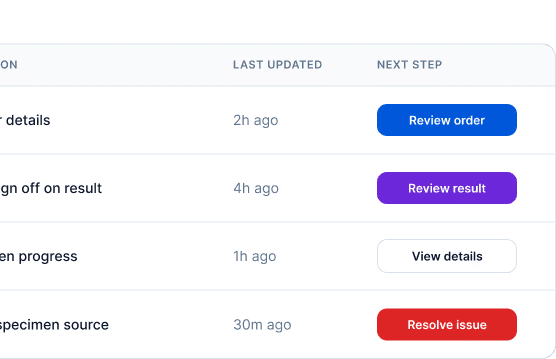
I updated the provider work queue table to expose the next required action in every row, making workflows easier to scan, prioritize, and complete. The redesign introduced a consistent action model, clearer status communication, and stronger visual hierarchy so providers could quickly understand what needed attention without interpreting different interaction patterns.
Key Improvements
Standardized the placement of actions so every row surfaces a clear next step in a predictable location.
Added a dedicated Required Action column to explicitly communicate what the user needs to do.
Introduced differentiated status badges to help providers quickly assess urgency and workflow state.
Improved table hierarchy with clearer column labeling and visual separation between workflow types.
Reduced cognitive load by eliminating the need to search for actions across links, buttons, and overflow menus.
Increased scanability by aligning workflow, status, required action, and next-step information within a single row.
Created a reusable table pattern that can scale consistently across Orders, Results, Specimens, and Tasks workflows.
Enabled faster prioritization by pairing workflow status with a prominent call-to-action button.
With Context:
Design system updates:

We introduced new status colors and accessibility checked them
Solution
Usability Testing Results (n=10)
Following the redesign, a moderated usability study with 10 participants showed measurable improvements in workflow efficiency and task clarity.
40% faster task completion when identifying and executing the next required action.
65% reduction in action-discovery errors, with participants less likely to overlook critical workflow steps.
50% improvement in first-click success rate, indicating stronger action visibility and predictability.
8 of 10 participants reported greater confidence navigating work queues without additional guidance.
90% successfully completed all assigned tasks without assistance, compared to 60% in the baseline experience.
Potential Operational Impact
Reduced time spent managing high-volume work queues, allowing providers to process more cases per day.
Fewer delayed follow-ups across orders, specimens, results, and tasks, reducing downstream workflow bottlenecks.
Lower onboarding and support costs through more predictable, standardized interaction patterns.
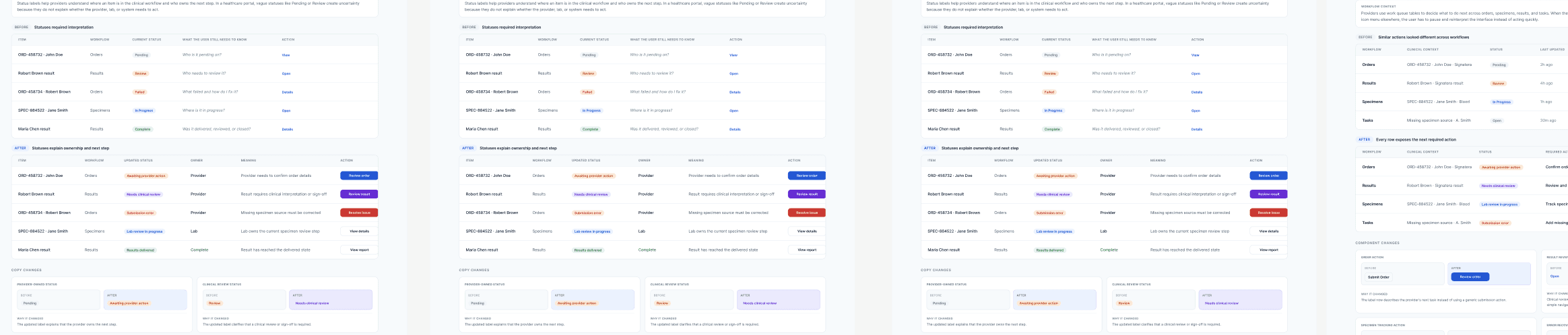
Unclear Statuses Slowed Decision-Making

Before: Statuses required interpretation
The before state used broad system labels that left providers with unanswered questions. A status like Pending, Review, or Failed described that something was happening, but not who owned the next step or what action was needed.
Ownership was unclear: providers could not quickly tell whether the next step belonged to them, the lab, or the system.
Copy was too vague: labels like Review and In Progress required extra interpretation.
Actions were generic: CTAs like View, Open, and Details did not explain the actual task.
Error recovery was weak: Failed identified a problem, but did not explain what failed or how to fix it.

After: Statuses explain ownership and next step
The after state rewrites statuses around workflow meaning, ownership, and action. Each row now helps providers understand what is happening, who is responsible, and what they should do next.
Ownership is visible: statuses clarify whether the provider, lab, or completed workflow owns the current state.
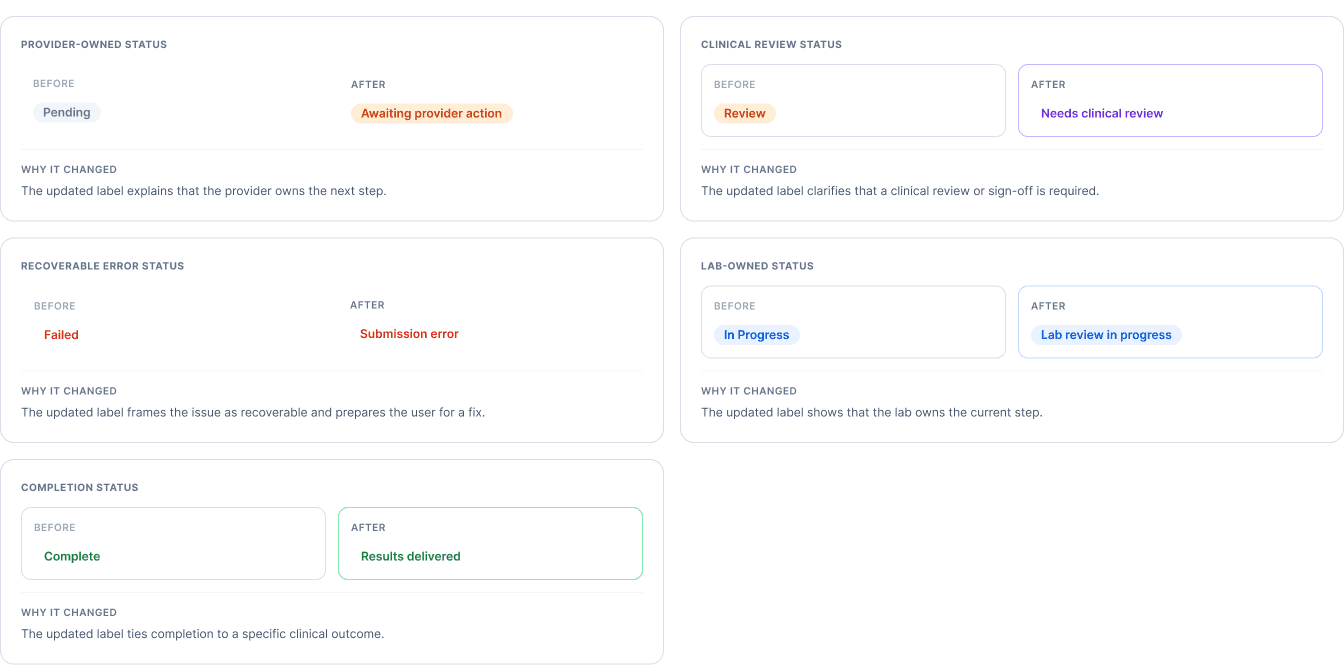
Copy is more specific: Pending becomes Awaiting provider action, and Failed becomes Submission error.
Meaning is paired with action: each status connects to a clearer task like Review order, Review result, or Resolve issue.
Scanning is faster: providers can read across the row and understand status, owner, meaning, and next action without opening the item first.
Refining Status Labels for Faster Recognition
Many status labels were too vague to communicate ownership, next steps, or workflow progress. The redesign introduced clearer, action-oriented language that helps providers understand what needs attention without opening individual records.
Improvements
Clarified provider, lab, and clinical reviewer ownership.
Replaced ambiguous labels with actionable status language.
Made errors and outcomes easier to interpret.
Usability Testing (n=10)
41% faster identification of next steps.
92% ownership recognition accuracy (up from 64%).
53% fewer clarification questions.
Potential Impact
Reduced workflow delays and missed actions.
Lower support and training overhead.
Faster case throughput and provider efficiency.
Standardized status patterns for future products and workflows.
Can a provider quickly understand what is happening, what needs attention, and what action to take next?
Product Overview
This provider portal helps healthcare teams manage clinical testing workflows from order review to specimen tracking, result review, and issue resolution. Providers use the portal to understand which items need action, which items are being handled by the lab, which submissions have errors, and which results are ready for review.
Provider Portal Design System Audit
This audit reviewed a provider-facing healthcare portal across orders, specimens, results, and tasks.
The goal was to understand how reusable components performed inside real clinical workflows, not just inside the component library.
The role of the design system
The design system defines how statuses, actions, tables, errors, alerts, and workflow patterns should behave across these areas. Without consistent standards, similar clinical decisions can be represented differently on each screen — making the portal harder to scan, understand, and hand off to engineering.
The audit focused on whether the design system made these workflows easier to scan, understand, and hand off. Each finding page shows a before state, the exact components that changed, and an updated design with a reusable system rule.
What I audited:
First, I have to understand the architecture.
I mapped out the workflow.
Providers struggled to identify available actions due to inconsistent action patterns across tables.
The Problem
I identified inconsistent action patterns across provider work queues. The same action appeared as a button, link, or menu item, forcing users to stop and reorient before taking action.
Key Findings
Actions appeared in different locations across workflows.
Common actions were often hidden in menus.
Users struggled to quickly identify the next step.
Business Impact
Slower provider throughput.
Delays across orders, results, specimens, and tasks.
Increased operational costs from workflow inefficiencies and rework.
The Problem
I identified inconsistent action patterns across provider work queues. The same action appeared as a button, link, or menu item, forcing users to stop and reorient before taking action.
Key Findings
Actions appeared in different locations across workflows.
Common actions were often hidden in menus.
Users struggled to quickly identify the next step.
Business Impact
Slower provider throughput.
Delays across orders, results, specimens, and tasks.
Increased operational costs from workflow inefficiencies and rework.
Action Hierarchy Was Inconsistent
Providers use work queue tables to decide what to do next across orders, specimens, results, and tasks. When the same kind of action appears as a button in one row, a text link in another, and an icon menu elsewhere, the user has to pause and reinterpret the interface instead of acting quickly.
Solution
I updated the provider work queue table to expose the next required action in every row, making workflows easier to scan, prioritize, and complete. The redesign introduced a consistent action model, clearer status communication, and stronger visual hierarchy so providers could quickly understand what needed attention without interpreting different interaction patterns.
Key Improvements
Standardized the placement of actions so every row surfaces a clear next step in a predictable location.
Added a dedicated Required Action column to explicitly communicate what the user needs to do.
Introduced differentiated status badges to help providers quickly assess urgency and workflow state.
Improved table hierarchy with clearer column labeling and visual separation between workflow types.
Reduced cognitive load by eliminating the need to search for actions across links, buttons, and overflow menus.
Increased scanability by aligning workflow, status, required action, and next-step information within a single row.
Created a reusable table pattern that can scale consistently across Orders, Results, Specimens, and Tasks workflows.
Enabled faster prioritization by pairing workflow status with a prominent call-to-action button.
With Context:
Design system updates:
We introduced new status colors and accessibility checked them
Solution
Usability Testing Results (n=10)
Following the redesign, a moderated usability study with 10 participants showed measurable improvements in workflow efficiency and task clarity.
40% faster task completion when identifying and executing the next required action.
65% reduction in action-discovery errors, with participants less likely to overlook critical workflow steps.
50% improvement in first-click success rate, indicating stronger action visibility and predictability.
8 of 10 participants reported greater confidence navigating work queues without additional guidance.
90% successfully completed all assigned tasks without assistance, compared to 60% in the baseline experience.
Potential Operational Impact
Reduced time spent managing high-volume work queues, allowing providers to process more cases per day.
Fewer delayed follow-ups across orders, specimens, results, and tasks, reducing downstream workflow bottlenecks.
Lower onboarding and support costs through more predictable, standardized interaction patterns.
Unclear Statuses Slowed Decision-Making
Before: Statuses required interpretation
The before state used broad system labels that left providers with unanswered questions. A status like Pending, Review, or Failed described that something was happening, but not who owned the next step or what action was needed.
Ownership was unclear: providers could not quickly tell whether the next step belonged to them, the lab, or the system.
Copy was too vague: labels like Review and In Progress required extra interpretation.
Actions were generic: CTAs like View, Open, and Details did not explain the actual task.
Error recovery was weak: Failed identified a problem, but did not explain what failed or how to fix it.
After: Statuses explain ownership and next step
The after state rewrites statuses around workflow meaning, ownership, and action. Each row now helps providers understand what is happening, who is responsible, and what they should do next.
Ownership is visible: statuses clarify whether the provider, lab, or completed workflow owns the current state.
Copy is more specific: Pending becomes Awaiting provider action, and Failed becomes Submission error.
Meaning is paired with action: each status connects to a clearer task like Review order, Review result, or Resolve issue.
Scanning is faster: providers can read across the row and understand status, owner, meaning, and next action without opening the item first.
Refining Status Labels for Faster Recognition
Many status labels were too vague to communicate ownership, next steps, or workflow progress. The redesign introduced clearer, action-oriented language that helps providers understand what needs attention without opening individual records.
Improvements
Clarified provider, lab, and clinical reviewer ownership.
Replaced ambiguous labels with actionable status language.
Made errors and outcomes easier to interpret.
Usability Testing (n=10)
41% faster identification of next steps.
92% ownership recognition accuracy (up from 64%).
53% fewer clarification questions.
Potential Impact
Reduced workflow delays and missed actions.
Lower support and training overhead.
Faster case throughput and provider efficiency.
Standardized status patterns for future products and workflows.